

Key Takeaways
Vancouver businesses can significantly reduce wasted ad spend and improve ROI by treating Google Ads audience targeting as a structured system rather than a secondary setting.
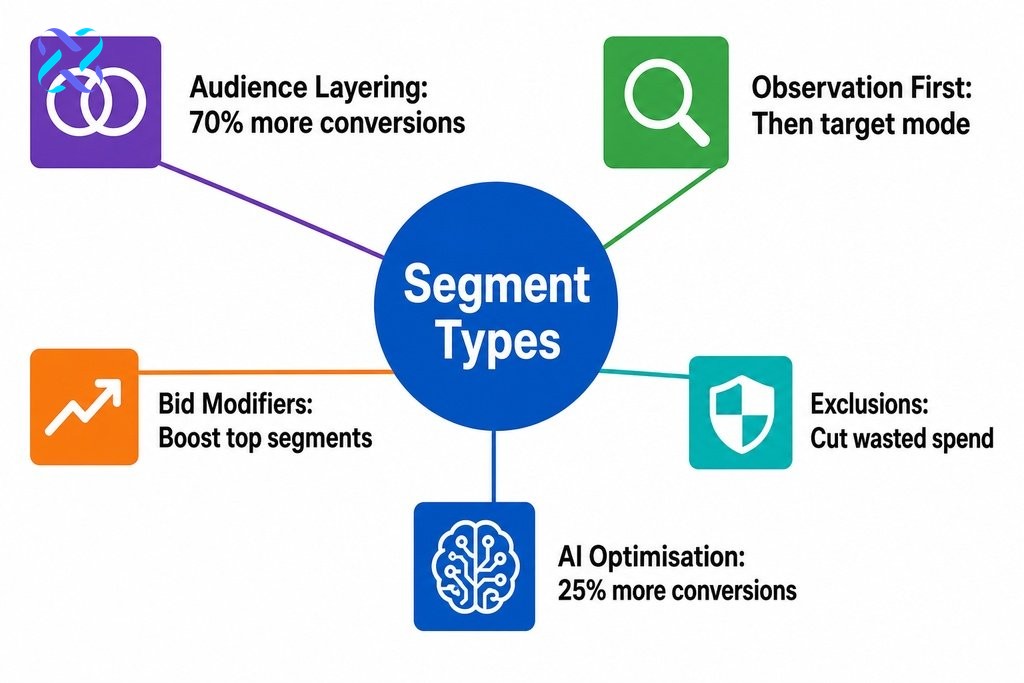
- Audience targeting is a performance system, not a one time configuration. Selecting the right segment types, layering them strategically, and pairing them with smart bidding all work together to improve return on ad spend.
- Start campaigns in Observation mode to collect real performance data across segments before switching to Targeting mode. Moving too early can collapse your eligible audience and limit the data needed for confident decisions.
- Audience layering combines multiple signals such as in market segments, demographic filters, and remarketing lists so your budget concentrates on users who match several characteristics of your proven converters at once.
- Use bid modifiers to direct budget toward segments that convert at higher rates, and apply exclusions to remove segments with consistently poor conversion rates. Together, these reduce wasted spend across the account.
- Conversion tracking accuracy is essential before scaling any audience strategy. Audience performance data is only as reliable as the conversion events being tracked at the campaign and account level.
Most advertisers invest significant time in keyword selection and ad copy, then treat audience targeting as an afterthought. The result is predictable: budgets drain quickly, click-through rates disappoint, and cost per lead climbs without explanation. Audience targeting is not a secondary setting you configure once and forget. It is the mechanism that determines who sees your ads, how much you pay for that exposure, and whether the traffic you attract is likely to become a customer.
This guide takes a consultant-level approach to audience targeting in Google Ads, covering the core segment types, how layering works in practice, and what to verify before scaling any strategy. Whether you manage campaigns in-house or are evaluating when to bring in a specialist, every section is built around one outcome: better return on ad spend from smarter targeting decisions.
What Is Google Ads Audience Targeting?
Google Ads audience targeting controls which users see your ads based on their interests, behaviours, demographics, or prior interactions with your brand. Rather than showing ads to everyone who searches a keyword, it lets you narrow or prioritise delivery to the people most likely to convert, reducing wasted spend and improving overall campaign efficiency.
Why Audience Targeting Is a Performance Lever, Not a Feature List
Advertisers who struggle to lower cost per lead often treat targeting options as a checklist: enable a few audience segments, assume the work is done, and move on. What they miss is that audience targeting is a system, not a setting. The segments you choose, how you layer them, and how you pair them with bidding strategies all interact to shape campaign efficiency in ways that keyword selection alone cannot achieve.
According to Google Ads reach data cited by Keywordme, 63% of internet users have clicked on a Google Ad, which represents an enormous pool of potential impressions. Without precise audience targeting, ads reach a wide population that includes people who will never buy from you, driving up costs without improving outcomes. Treating targeting as a strategic system is the shift that separates campaigns with strong return on ad spend from those that burn through budget without results. For businesses competing in a market as active as Metro Vancouver, that distinction matters even more.
The Core Targeting Options in Google Ads
Google Ads organises its audience segments into distinct types, each drawing from different data sources and suited to different stages of the purchase funnel. As confirmed by Google Ads Help documentation, the five primary segment categories are:
- Affinity segments — built for awareness campaigns, grouping users by long-term interests and lifestyle patterns.
- In-market segments — capture users actively researching or comparing products in a specific category, making them well-suited for conversion-focused campaigns.
- Life events — target users at major personal milestones such as moving or getting married, useful for businesses whose offering is tied to those transitions.
- Remarketing lists — built from users who have previously interacted with your website or app.
- Customer Match — allows you to upload your own customer data to reach known contacts across Google’s network.
| Segment Type | Data Source | Best Funnel Stage | Primary Use Case |
|---|---|---|---|
| Affinity | Long-term interest and lifestyle signals | Awareness | Brand reach to relevant audiences |
| In-market | Active research and comparison behaviour | Consideration | Conversion-focused campaigns |
| Life events | Major personal milestone signals | Awareness / Consideration | Businesses tied to life transitions |
| Remarketing lists | Your website or app interaction data | Decision | Re-engaging prior visitors |
| Customer Match | Your own CRM / customer data | Decision / Retention | Reaching known contacts across Google |
Remarketing and Customer Match operate differently from the other segments because they rely on data you already own. If you are planning to build out a remarketing audience strategy in google ads or explore how customer match in google ads can support retention and re-engagement, those topics receive their own focused treatment separately within this content series. The key point is that each segment type serves a specific purpose, and selecting the right type for each campaign stage is the foundation of any paid search audience strategy.
Observation Mode vs. Targeting Mode
Confusing Observation mode with Targeting mode is one of the most common and costly mistakes in paid search.
- Targeting mode restricts ad delivery to only the users in your selected audience. Applied too early, this can collapse reach and starve a campaign of the volume it needs to generate meaningful data.
- Observation mode allows ads to serve to your full eligible audience while simultaneously tracking how specific segments perform within that broader pool.
The practical recommendation is to start with Observation mode, collect performance data across segments, and switch to Targeting mode only once you have clear evidence that a specific segment converts at a rate that justifies the narrower reach.

How Audience Layering Turns Segments Into a System
Audience layering means combining multiple audience signals so your ads reach users who satisfy more than one targeting condition at the same time. Rather than applying a single in-market segment, you might layer it with a demographic filter and a remarketing list. The result is a tighter audience that more closely matches the profile of your actual buyers, improving bid efficiency by concentrating spend on users who share several characteristics of your proven converters.
According to Marketing LTB, in-market audiences drive 10% higher click-through rates than affinity audiences, which illustrates why matching segment type to funnel stage matters. When you layer an in-market segment on top of a remarketing list, you combine active purchase intent with prior brand familiarity, narrowing reach to the most qualified traffic available. Remarketing audiences are reported to be 70% more likely to convert than cold audiences across paid channels, as noted by Searchlab in their Retargeting Statistics 2026 analysis. That conversion lift reflects the compounding effect of combining intent signals with behavioural data, which is exactly what audience layering is designed to achieve.
Building Layers That Reflect Your Customer Journey
Effective audience layering requires mapping your segments to the real stages your customers move through before they buy:
- Awareness stage — affinity segments reach users who match your buyer profile but may not yet know they need your solution.
- Consideration stage — in-market segments become more relevant as users actively research their options.
- Decision stage — remarketing lists and Customer Match data are the most valuable inputs, capturing users who already have a relationship with your brand or product category.
Applying a single segment across an entire campaign ignores this progression and forces your budget to work against itself at different funnel stages.
How Vancouver Businesses Can Use Audience Data to Reduce Wasted Spend
Using audience data in PPC goes beyond selecting who sees your ads. Once Observation mode has collected enough performance data, that information becomes actionable in two important ways:
- Bid modifiers — increase bids for segments that convert at higher rates, so your budget naturally flows toward users more likely to become customers.
- Exclusions — remove underperforming segments from your eligible audience so your budget is not spent on groups with consistently poor conversion rates.
This is where the Google Ads Audience Insights tool becomes genuinely useful. It surfaces index scores showing how over- or underrepresented each segment is among your actual converters compared to the general audience you are targeting. A segment that indexes high among converters is a candidate for a positive bid modifier or promotion to Targeting mode. A segment that consistently underperforms is a candidate for exclusion. Over time, this process of collecting, analysing, and acting on audience data is what separates campaigns that improve each month from those that flatline. Smart Bidding strategies also use audience signals as inputs, which means well-structured audience layers amplify the performance of automated bidding rather than operating independently of it.
| Action | When to Apply | Effect on Campaign | Best Suited For |
|---|---|---|---|
| Positive bid modifier | Segment indexes high among converters | Budget flows toward higher-converting users | In-market, remarketing, high-value demographics |
| Promote to Targeting mode | Segment shows consistently strong conversion rate | Restricts delivery to that segment only | Well-validated segments with sufficient volume |
| Exclusion | Segment consistently underperforms over time | Removes segment from eligible audience entirely | Low-intent demographics, non-converting interests |
| No change (continue observing) | Insufficient data to act confidently | Maintains current reach while data accumulates | New accounts, niche industries, small list sizes |
What to Check Before Scaling Any Audience Strategy
Before committing significant budget to any audience configuration, verify the following:
- Customer Match list size — lists require a minimum number of matched users before Google will activate them, based on matched records after upload, not the total size of your CRM export.
- Remarketing list volume — a list with only a few hundred users may not produce data you can act on with confidence.
- Conversion tracking accuracy — audience performance data is only as reliable as the conversion events being tracked at the campaign and account level.
A new account with limited historical data will need more time in Observation mode before that data becomes actionable. A business in a niche industry, whether professional services in Downtown Vancouver, trades across the Lower Mainland, or e-commerce reaching customers province-wide, may find that some in-market segments lack the volume to deliver meaningful reach. These are not reasons to avoid the approach; they are reasons to build it carefully. The broader topic of google ads campaign types and use cases also plays a role here, since the audience options available to you differ depending on whether you are running Search, Display, YouTube, or Performance Max campaigns.

Should You Manage Audience Targeting Yourself or Hire a Specialist?
Managing Google Ads audience targeting in-house is entirely feasible for businesses running a single campaign type with a clear conversion event and a modest budget. If your setup is straightforward, your pixel is verified, and you are willing to spend time in Observation mode before making structural changes, self-management can work well.
The challenge emerges when campaign complexity increases. Multi-campaign structures, overlapping audience layers, declining quality scores, and budget allocation across different funnel stages all require analytical attention that goes beyond basic platform familiarity. The scenarios where working with a performance-focused agency tends to add the most measurable value involve cross-campaign audience signals, Smart Bidding configuration, and creative decisions informed by segment data. Missing the small signals in your data that point to a budget allocation problem or a targeting conflict is a real risk, and that is where an outside perspective with the right analytical infrastructure can make a practical difference.
How a Systems-Led Approach to Google Ads Delivers Measurable Results
At Leadsagna, every Google Ads engagement starts with building an audience framework before a single dollar of ad spend is committed. That means auditing the existing data infrastructure, verifying conversion tracking, mapping audience segments to the actual stages of the client’s customer journey, and identifying which segment types are appropriate given the campaign types in use. Decisions are based on what the data shows, not on intuition.
AI-powered analysis plays a central role in how this process scales. According to Marketing LTB, advertisers using AI-based optimisation report 25% more conversions, and predictive targeting may improve cost-per-acquisition efficiency by around 20%. These figures reflect what is possible when audience signals are structured correctly and fed into automated bidding systems that process them at a speed and scale that manual review cannot match. Leadsagna uses this capability to surface high-value audience segments, automate bid adjustments in response to real-time performance shifts, and identify exclusion opportunities that reduce wasted spend across the account, producing a paid search audience strategy that improves with every campaign cycle.
If your current Google Ads campaigns are spending budget without producing the leads or sales your business needs, the most likely issue is not your keywords or your creative. It is your audience structure. Leadsagna works with businesses in Vancouver and across Canada to build targeting systems that bring the right people to your ads and turn that traffic into measurable revenue. Reach out to the team and let us show you exactly what a smarter audience strategy looks like for your specific goals.
Frequently Asked Questions Related to Google Ads Audience Targeting
What is the difference between affinity and in-market audiences in Google Ads?
Affinity audiences group users by long-term interests and lifestyle patterns, making them suited for brand awareness. In-market audiences capture users who are actively researching or comparing products in a specific category right now, making them better suited for conversion-focused campaigns where purchase intent is already present.
When should a Vancouver business switch from Observation mode to Targeting mode?
Switch to Targeting mode only after Observation mode has collected clear evidence that a specific segment converts at a rate that justifies the narrower reach. Moving too early can collapse your campaign’s eligible audience and limit the data volume needed to make reliable optimisation decisions.
How does audience layering improve Google Ads performance?
Audience layering combines multiple signals, such as an in-market segment, a demographic filter, and a remarketing list, so ads reach users who match several characteristics of your proven converters at once. This concentrates your budget on the most qualified traffic and improves bid efficiency across the campaign.
What is Customer Match in Google Ads and how is it used?
Customer Match lets you upload your own customer data, such as email addresses, to reach known contacts across Google’s network. It is particularly useful for re-engagement campaigns or for excluding existing customers from acquisition-focused ad groups to avoid wasted spend.
How do bid modifiers and exclusions reduce wasted ad spend?
Bid modifiers increase bids for audience segments that convert at higher rates, directing your budget toward users more likely to become customers. Exclusions remove segments with consistently poor conversion rates from your eligible audience entirely. Together, they help concentrate your budget where it is most likely to produce measurable results.
Does audience targeting work the same way across all Google Ads campaign types?
No. The audience options available to you differ depending on whether you are running Search, Display, YouTube, or Performance Max campaigns. Some segment types are available across all campaign types, while others are restricted or behave differently depending on the format, which is why campaign type is an important factor when building your audience strategy.


