


Key Takeaways
A pillar page strategy connects your content into a structured hub that signals topical authority to Google and drives consistent organic traffic.
- Disconnected blog posts limit your rankings regardless of quality; a pillar page strategy builds a content architecture where every piece reinforces a central hub and signals genuine expertise to Google.
- A strong pillar page structure includes a broad central page of 3,000 to 5,000 words, cluster articles covering specific subtopics, and consistent internal linking flowing in both directions between the pillar and each cluster.
- Effective pillar content planning requires choosing a topic that can support five to ten cluster articles, attracts meaningful search demand, and connects directly to the services your audience needs.
- Hub page SEO depends on content depth, crawlability, page speed, and consistent anchor text; orphaned cluster posts and keyword cannibalization are the most common structural mistakes that quietly undermine performance.
- Build one complete hub before starting a second; measure success by ranking movement, organic sessions across the hub, and lead volume rather than publish counts alone.
Most businesses that struggle to rank on Google are not publishing bad content. They are publishing disconnected content. Individual blog posts cover related topics but never reference each other, never funnel authority toward a central page, and never signal to search engines that this website genuinely owns a subject. A deliberate pillar page strategy solves this problem at the structural level, and for businesses serious about growing organic traffic, it is one of the most impactful investments available in SEO today.
This guide walks through exactly how the model works, what separates high-performing content hubs from pages that sit unread, and how to build the structure in a way that ties directly to leads and revenue rather than vanity metrics.
Why Most Content Plans Stall Before They Rank
The most common pattern in underperforming content strategies is simple: topics are chosen based on what feels relevant rather than how they connect to each other. A company publishes a post on keyword research, another on meta descriptions, and another on Google Analytics. Each one is a standalone effort with no architectural relationship to the others. Google reads this as a sign that the site lacks genuine topical depth, and it distributes ranking authority accordingly. The result is a library of posts that individually rank on page three or four and collectively produce very little organic traffic.
The deeper issue is that this approach treats content as a publishing task rather than a structural one. Every article added to a disconnected blog carries roughly the same ranking ceiling regardless of its quality, because nothing on the site confirms to search engines that this domain has comprehensive expertise on the subject. A pillar page strategy changes that by creating a deliberate architecture where every piece of content reinforces a central hub, and that hub reinforces the site’s authority on a defined topic. This is a positioning decision, not just an editorial one.

What Is a Pillar Page Strategy?
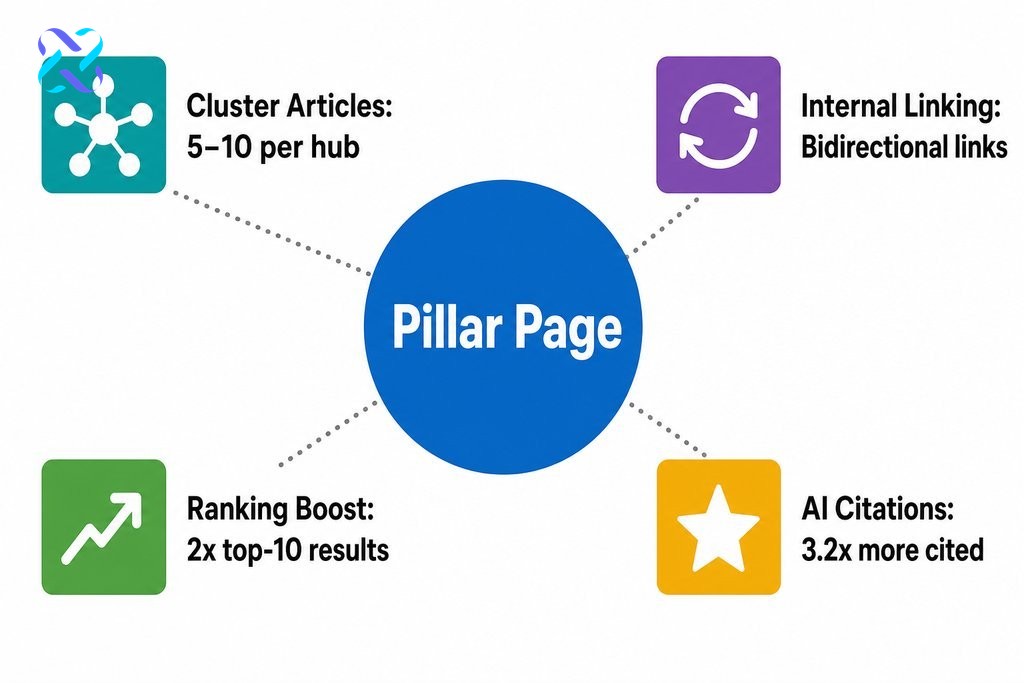
A pillar page strategy is an interconnected content system built around three elements: a pillar page at the centre that covers a broad topic at a high level, a set of cluster articles that each go deeper on a specific subtopic, and a consistent internal linking strategy that connects all of them bidirectionally.
The pillar page links out to each cluster article for more detail. Each cluster article links back to the pillar and, where relevant, to other cluster pieces within the same hub. Together, they form a content hub that signals to Google exactly what this website covers and how comprehensively it covers it.
This structure mirrors how people actually search. A user exploring a topic rarely reads one article and stops. They search for the broad concept, then dive into specific questions as their understanding grows. When your site has content mapped to each stage of that journey and all of it is connected, you become the destination rather than a single stop along the way. According to HubSpot, pages within cluster structures ranked in the top ten of Google results twice as often as unlinked pages covering similar topics.
What a Pillar Page Must Include
A well-built pillar page typically runs between 3,000 and 5,000 words and covers a broad subject comprehensively without trying to exhaust every subtopic in a single document. It needs enough depth to stand alone as a genuinely useful resource, clear section headings so readers and search engines can navigate it easily, explicit links to each supporting cluster article, and ungated access. If the page is hidden behind a form or login, it cannot be crawled, indexed, or cited.
How Cluster Articles Strengthen the Pillar
Each cluster article should target a specific subtopic or question that a reader of the pillar page would logically want to explore next. When a cluster article links back to the pillar, it passes relevance signals upward, strengthening the pillar’s authority on the broader topic. This bidirectional flow of internal links is what separates a true content hub from a collection of articles that happen to cover similar ground.
According to Semrush, 25% of web pages have zero incoming internal links, making them essentially invisible to search engines. Cluster articles without a return link to the pillar face exactly this risk.
| Attribute | Pillar Page | Cluster Article |
|---|---|---|
| Topic scope | Broad, covers the full subject at a high level | Narrow, goes deep on one specific subtopic |
| Typical length | 3,000 to 5,000 words | Varies by subtopic depth |
| Internal linking role | Links out to all cluster articles | Links back to the pillar (and to related clusters) |
| Access requirement | Must be ungated for crawlability | Should also be publicly accessible |
| Primary SEO function | Anchors topical authority for the entire hub | Passes relevance signals upward to the pillar |
How to Choose the Right Topic for Your Pillar Page
Pillar content planning starts with one filter: can this topic support five to ten cluster articles without those articles feeling forced or superficial? If not, the topic is either too narrow to anchor a hub or too broad to match a specific audience need.
The right pillar topic sits at the intersection of genuine search demand, clear business relevance, and enough subtopic depth to sustain a full content architecture. For a Vancouver-based digital marketing agency, a topic like “SEO for small businesses” passes this test. A topic like “what is a meta tag” does not.
The same logic applies across Metro Vancouver industries, whether you are a professional services firm in downtown Vancouver, a trades business serving the North Shore, or a retailer operating across Burnaby and Surrey. The pillar topic should reflect what your customers are actively searching for, not simply what feels relevant to write about.
Business relevance matters just as much as search volume. There is no value in building authority around a topic that does not connect your audience to your services. The topic should reflect what your customers are actively trying to understand or solve, and your business should be the logical next step once they have read through the hub.

Pillar Page Examples: What Makes Them Work
The most instructive pillar page examples are not necessarily the most beautifully designed ones. They are the ones that have earned consistent rankings over time through structural work, not aesthetic work.
High-performing pillar pages share several traits: they cover the core topic with enough breadth to satisfy informational intent, they segment clearly into navigable sections, they link to cluster content that handles specific decisions or use cases, and they sit inside a functioning content hub rather than standing as isolated documents.
What separates pages that rank consistently from those that get indexed and ignored is usually not writing quality alone. It is whether internal link equity is flowing through the hub, whether the page is updated regularly, and whether the topical boundary is clear enough that Google understands exactly what this section of the site covers. Research from Moz found that pillar pages significantly outperformed regular blog posts as magnets for inbound links, organic traffic, and newsletter subscribers over the course of a year.
Hub Page SEO: The Signals That Matter Most to Google
Hub page SEO is about more than keyword placement. The factors that most influence how a pillar page performs are content depth, internal link architecture, and technical fundamentals like page speed and crawlability.
Content depth means covering the topic thoroughly enough that Google recognises the page as a genuine reference, not a surface-level overview. Internal link architecture means every cluster article links to the pillar, the pillar links to every cluster article, and anchor text is consistent and descriptive throughout. Technical prerequisites like page speed and crawlability cannot be compensated for by quality writing alone. They are the foundation everything else depends on.
The mistakes that most commonly undermine hub page SEO include thin pillar pages that outsource too much depth to the clusters, orphaned cluster posts that were published but never linked back to the pillar, inconsistent anchor text that confuses search engines about what the hub covers, and keyword cannibalization, where multiple pages target the same query and compete against each other instead of reinforcing a single authoritative page. A well-planned content hub eliminates cannibalization by assigning each query to a specific level of the architecture.
| Mistake | Impact on Rankings | How to Fix It |
|---|---|---|
| Thin pillar page | Google does not recognise the page as a genuine reference | Expand coverage so the pillar stands alone as a useful resource |
| Orphaned cluster articles | Pages are invisible to search engines; authority does not flow | Add bidirectional internal links between every cluster and the pillar |
| Inconsistent anchor text | Confuses search engines about what the hub covers | Use consistent, descriptive anchor text throughout the hub |
| Keyword cannibalization | Multiple pages compete against each other instead of reinforcing one | Assign each query to a specific level of the content architecture |
| Poor technical fundamentals | Crawlability and page speed issues limit indexing and rankings | Audit and resolve technical issues before scaling the hub |

How to Build Your Content Hub Without Wasting Budget
The most practical approach is to build one complete hub before expanding to a second. Choose the topic most directly tied to your highest-value service or product, build the pillar page first, then publish cluster articles in order of search priority.
Trying to build multiple hubs simultaneously dilutes focus and typically results in several incomplete architectures instead of one that works. HubSpot research suggests that organisations implementing a topic cluster strategy can see meaningful increases in organic traffic, though results vary depending on domain authority, competition, and how consistently the hub is maintained. That kind of outcome comes from complete, well-linked hubs, not from partial structures that get abandoned halfway through.
Measure performance by tracking ranking movement on the pillar topic, organic sessions to the hub as a whole, and lead volume from pages within the cluster. Publish counts tell you nothing on their own. What matters is whether the hub is earning rankings, attracting the right visitors, and converting that traffic into contact requests or sales.
There is also a compelling reason to invest in this structure beyond traditional search. A Yext AI Citation Study analysing 6.8 million citations across ChatGPT, Gemini, and Perplexity found that topic clusters receive 3.2 times more AI citations than standalone posts. As AI-powered search becomes a larger share of discovery, a well-executed content hub strategy may pay dividends across multiple channels simultaneously.
Should Vancouver Businesses Build This In-House or Hire a Specialist?
In-house teams with strong writing resources and basic SEO knowledge can absolutely execute a pillar page strategy, provided they have clear direction on topic selection, internal linking logic, and performance measurement.
Where gaps typically appear is in the technical layer: crawl structure, anchor text consistency, page speed, and schema markup. These details do not require a large budget to address, but they do require someone who understands how search engines navigate a site. When those details are missed, even well-written content tends to underperform.
Before bringing in an agency, it is worth asking a few direct questions. Do they plan content architecture, including pillar page structure and cluster mapping, before writing begins, or do they treat each piece as a standalone deliverable? Do they connect content investment to measurable outcomes like rankings and leads, rather than just word counts and publish frequency? Is their process documented and repeatable, or does it depend entirely on one person’s instincts?
At Leadsagna, content strategy starts with architecture. Every pillar we build is mapped to business outcomes first, because content that does not move a commercial metric is not a strategy. It is a cost. We work with businesses across Vancouver and the broader Lower Mainland, and we understand the competitive landscape local companies are navigating online. If your current content plan is producing traffic without leads, or traffic without rankings, we would be glad to show you what a structured approach looks like for your specific market.
Frequently Asked Questions About Pillar Page Strategy
What is the difference between a pillar page and a regular blog post?
A pillar page is a comprehensive resource designed to anchor an entire topic cluster, typically running 3,000 to 5,000 words and linking to multiple supporting cluster articles. A regular blog post covers a single subtopic in isolation. The pillar page functions as a structural hub, while cluster posts funnel authority back toward it through internal links.
How many cluster articles do I need for a pillar page strategy to work?
A functional content hub generally needs five to ten cluster articles to establish meaningful topical coverage. Fewer than five often leaves gaps that prevent Google from recognising genuine depth. The exact number depends on how many distinct subtopics your audience is actively searching for within that subject area.
How long does it take for a pillar page strategy to produce results?
Most content hubs begin showing measurable ranking movement within three to six months of the full structure being published and indexed. Results depend on domain authority, competition level, and whether internal linking is correctly implemented from the start. Partial hubs with missing cluster links typically take longer to gain traction.
Can I convert existing blog posts into a pillar page strategy?
Yes. Auditing existing content is often the fastest starting point. Identify your strongest posts on related topics, designate one as the pillar, and retrofit internal links between them. Gaps in subtopic coverage can then be filled with new cluster articles rather than rebuilding everything from scratch.
Does a pillar page strategy help with AI-generated search results?
Structured content hubs appear more likely to be cited by AI search tools like ChatGPT, Gemini, and Perplexity. A Yext study found that topic clusters receive 3.2 times more AI citations than standalone posts. Clear topic segmentation and bidirectional internal linking make your content easier for AI systems to interpret and reference accurately.


